Scrollathon: Host Info & Run of Show
-
We’re thrilled to be partnering with you on this Scrollathon program. This page serves as a clear, day-of guide designed to make hosting easy and stress-free.
For day-of communication, text works best. If possible, please start a group text and be sure to include both William and me, and have everyone introduce themselves with their first and last name so we can easily save contacts and know who’s who.
Contacts
Steven Ladd: 646-238-7009
William Ladd: 917-650-0557 -
When you have a moment, please reply to the email that included this link with the following details:
The final start and end times for each of the three sessions
Whether day-before setup is possible, and if so, at what time
If day-before setup isn’t available, we’ll plan to arrive two hours before the first session to complete setup.
Please also confirm:
The exact room/location where the program will take place
Where we should load in and enter the building
We’ll be bringing several boxes along with two large rolling suitcases.
-
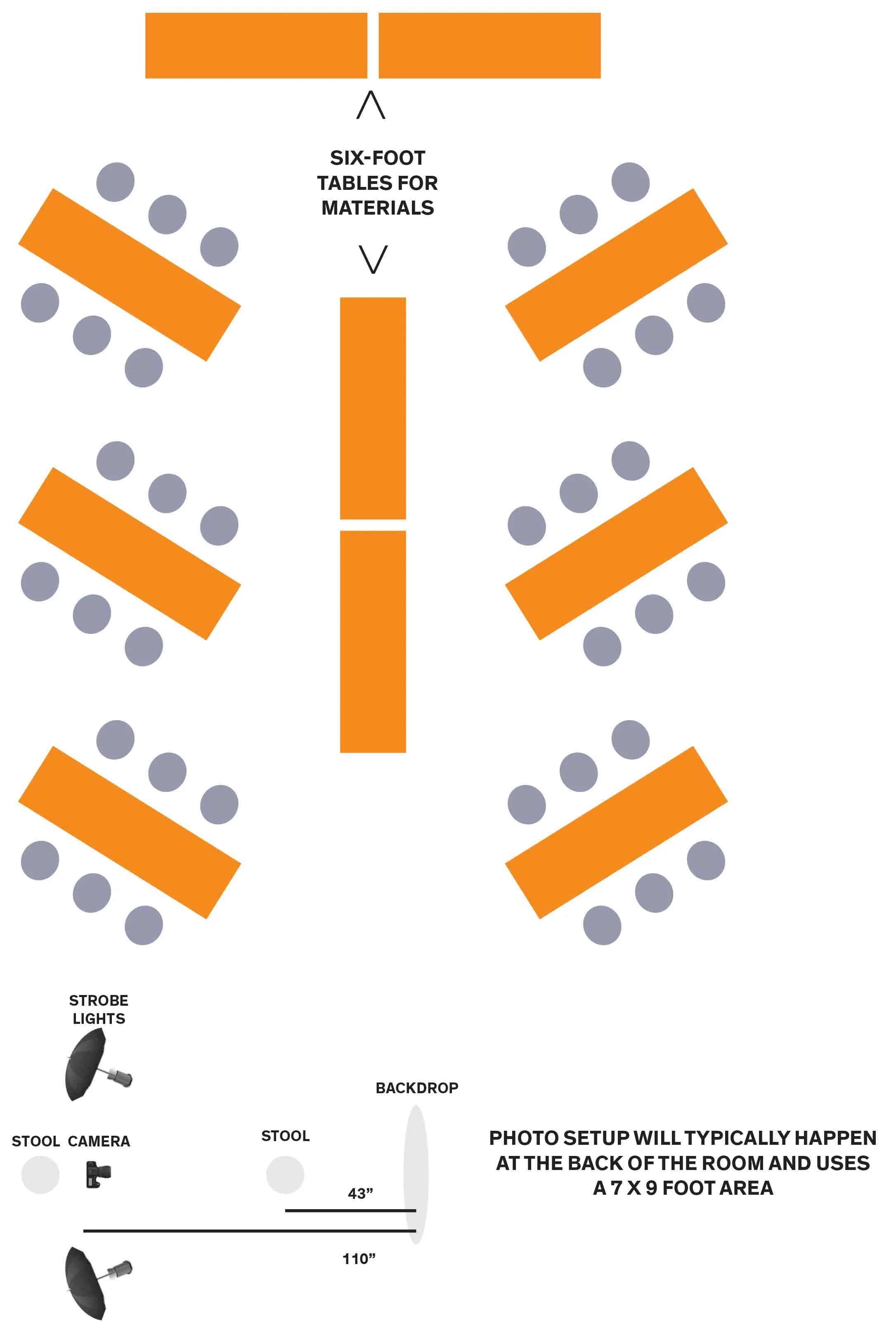
The room setup includes ten (10) 6-foot rectangular tables.
Six tables will be used for participant seating
Four tables will be used for materials and supplies
The layout includes 36 chairs total — approximately six chairs per participant table, positioned on both sides, with all chairs facing toward the front of the room.
If any materials or boxes have been shipped in advance, we’d appreciate them being placed in the room and ready for setup.
We’ll handle final adjustments once onsite.
-
Please place one 6-foot table and two chairs outside the room to serve as the check-in station.
All participants must check in before entering the room. This applies to students, teachers, administrators, parents, and service animals.
Check-in is required to ensure that everyone has completed the necessary participation release before joining the session.
-
Every participant must complete a Program Participation Release before entering the room.
Releases are completed digitally and need to be submitted about 1 - 2 weeks before the day of the program.
This step is essential for documentation, photography, and publication purposes.
-
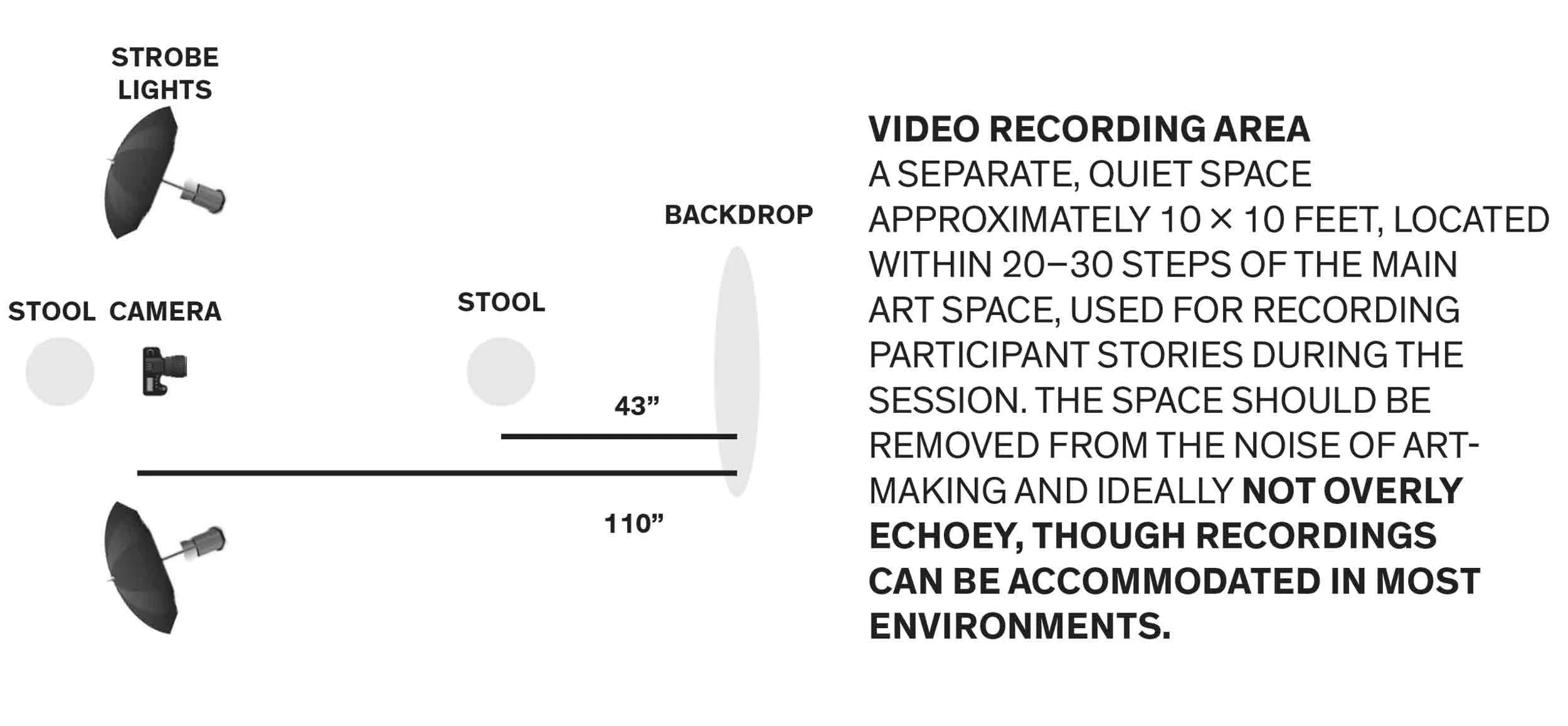
If available, we’d love to use two short stools, approximately 18 inches tall, sturdy, and non-rolling.
A simple wood stool is ideal, but a chair or piano bench works just as well.
If none of these are available, no problem at all — we’ll adapt easily.
-
We will be creating:
Individual participant portraits
Wide photographs of the room and activity
Short video footage throughout the sessions
All primary photography and video documentation is handled by our team.
If you have someone in your community who does strong photography and/or video (a student, teacher, or community member), we would love to invite them to help create additional photo and video documentation during the sessions. This is completely optional, but always a wonderful addition when available.
If a community photographer or videographer participates:
They will be considered a participant and must complete the participation release in advance
We’ll need their full name, contact information, and preferred credit (how they’d like to be acknowledged in photo and video credits)
We ask that all photos and video be shared with us the following day, so the material can be used on the website and in related publications
-
Ideally, one staff member would be positioned at the check-in table outside the room throughout all three sessions to ensure no one enters without completing the participation release.
If this role rotates between two staff members during the day, that’s completely fine — we’d just want both people briefed on the importance of confirming release completion before entry.
If available, having one staff member inside the room to help us pin scrolls would be wonderful. That said, we’re fully prepared to manage everything ourselves if needed.
Participants will be identified using our yellow Post-it name system (yellow Post-it notes with names written in red marker), so no additional name tags or identifiers are needed for participants. Staff are welcome to use name tags if they prefer.
-
Please share the Wi-Fi name and password for the space.
If possible, we’d also appreciate two printed copies of a QR we’ll send separately.
No additional materials or supplies are needed from the host.
-
We’d love to include your organization’s logo in a publication connected to this project.
Please send a high-resolution logo, ideally as:
A vector file (.ai, .eps, or .svg), or
A high-resolution PNG
Logos can be emailed or shared via download link.
-
Thank you so much for hosting and collaborating with us. We’re excited to work together and truly appreciate the care you’re putting into making this day a success.
If any questions come up, please don’t hesitate to reach out.
Art Room Diagram with Photo Setup